How to Configuring a remote for a fork

How to Configuring a remote for a fork

You must have to configure a remote that points to the upstream repository in git to sync changes mark you mark in a fork with the original repository .it also allow you to sync changes made in the original repository with the fork.

To configure a remote for a fork you have to follow few step as given below

  • Open Command Prompt / Open Git Bash

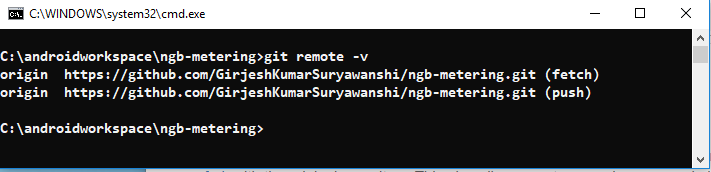
  • List The Current Git Repository For Your Fork

  • Specify a new remote upstream repository that will be synced with fork
  • Verify the new upstream repository you've specified for you fork.


  • Verify your configuration a remote for fork is correct or not 


Comments

Popular posts from this blog

How To Run Spring Project After Generate From Spring Initializer

How To Run Spring Project After Generate From Spring Initializer After Generating project from Spring initializer copy generated zip project on any folder like have created a folder in c:\intellijworkspace here paste zip project and extract it as shown below. After that open command prompt and go inside the project directory as shown below           After that inside project folder type command mvn, clean install and press enter as shown below After that project build process started as shown below Finally, Build Process Completed with success message as shown below After Build Successfully to run project type command mvn spring-boot :run as shown below Finally, project up successfully on port 8080 as shown below. To check project status open browser and type localhost:8080 it will display an error page that indicates project run successfully as shown below Now Enjoy Spring Boot ...